
Is Google Classroom Free to Use? Understanding the True Cost
When schools evaluate technology platforms, budget considerations inevitably arise. Google Classroom's headline claim is compelling: it's free. But is Google Classroom free to use in the comprehensive sense that matters for educational decision-making?
The Basic Answer: Yes, It's Free
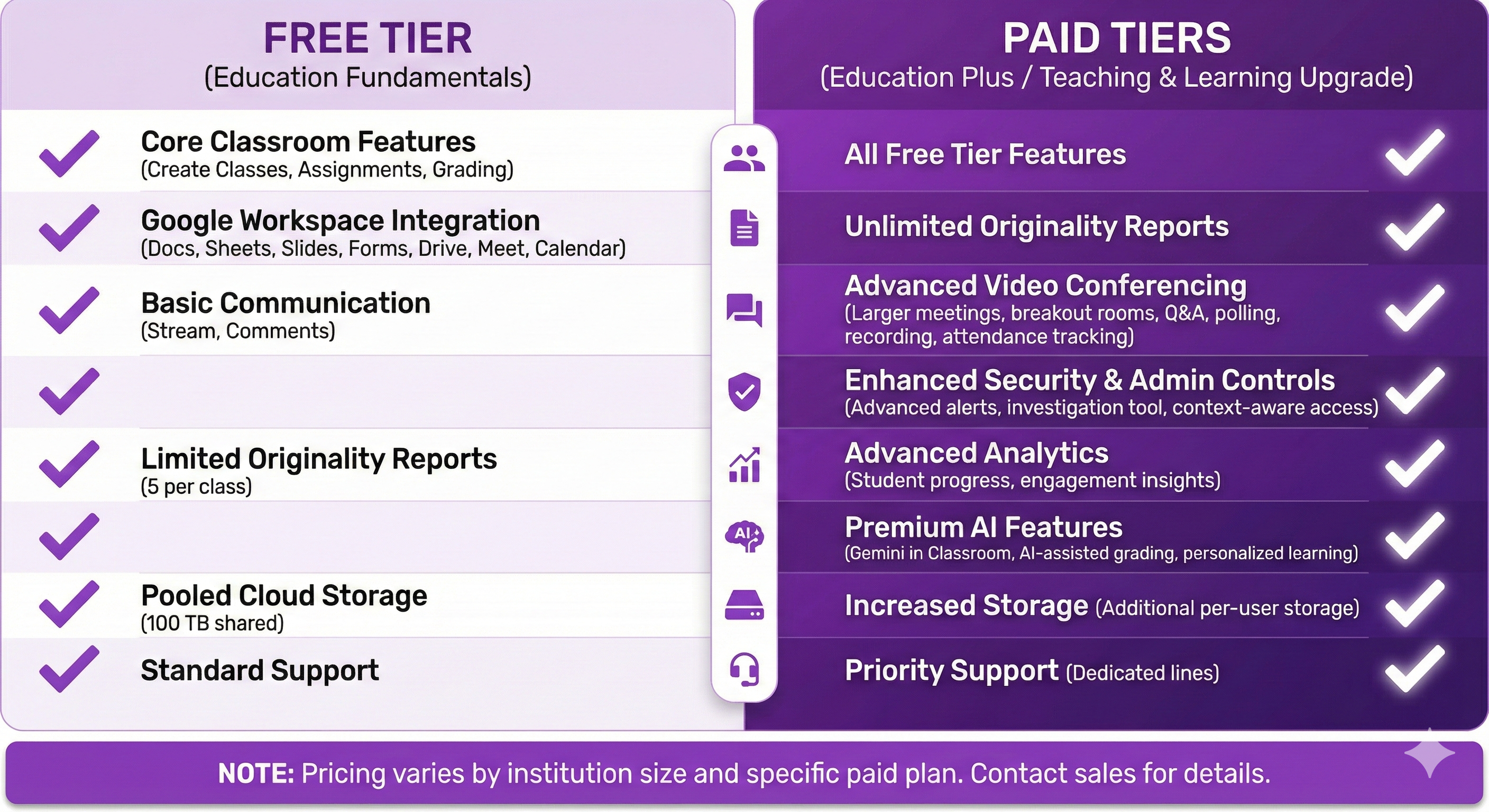
Google Classroom is available at no direct cost to schools using Google Workspace for Education Fundamentals. This free tier includes:
- Unlimited classes and students
- Assignment distribution and collection
- Basic grading functionality
- Integration with Google Drive, Docs, Sheets, and Slides
- Google Forms (including quiz mode)
- Basic communication tools
- Mobile apps for iOS and Android
For schools operating on tight budgets, this accessibility removes a significant barrier to digital learning infrastructure.
What's Included in the Free Tier
The free Google Workspace for Education Fundamentals package provides schools with:
Core Applications Gmail, Calendar, Drive, Docs, Sheets, Slides, Forms, and Sites all come included. Students receive individual accounts managed by the school.
Storage Schools receive pooled storage across all users, currently a substantial allocation that most schools won't exceed.
Admin Controls Basic administrative features let schools manage users, set policies, and maintain appropriate access controls.
Classroom Specifically All Classroom features are available without paid upgrades. You don't hit artificial limits that push you toward premium tiers.
The Hidden Costs of 'Free'
While no money changes hands, Google Classroom carries costs that don't appear on invoices:
Time Investment Learning the platform, training staff, creating workflows, and troubleshooting issues all consume time. Time is money, even when not directly billed.
Workarounds Google Classroom does many things adequately but few things excellently. When it falls short, teachers develop workarounds that consume planning time. Every workaround represents a hidden cost.
Opportunity Cost Using Google Classroom means not using alternatives that might serve certain purposes better. If another tool would save ten hours weekly but costs money, the 'free' option actually costs those ten hours.
Data Considerations Google provides free services in exchange for operating within their ecosystem. Schools must weigh the value of keeping students and data within Google's infrastructure.
Where Google Classroom Falls Short
The quiz functionality illustrates these limitations well. Google Forms quizzes are free, but they're also:
- Basic in visual design and engagement
- Lacking real-time competitive elements
- Missing sophisticated question types
- Without live monitoring capabilities
- Functionally adequate but uninspiring
For high-stakes assessment this might suffice. For regular formative assessment that should engage and motivate students? The free tool's limitations become costly in engagement terms.
Paid Alternatives Within Google
Google offers upgraded packages:
Google Workspace for Education Standard Adds enhanced security, advanced admin controls, and premium support. Pricing varies by institution.
Google Workspace for Education Plus The most comprehensive package includes all features plus advanced analytics, enhanced video conferencing, and more.
However, even these paid upgrades don't transform Classroom's quiz functionality into genuinely engaging, gamified experiences.
Is Google Classroom Worth It?
For schools already committed to the Google ecosystem, Classroom provides essential infrastructure. It handles:
- Organisation of classes and students
- Distribution of materials
- Collection of work
- Basic grading and feedback
- Communication between teachers and students
These functions work reliably and cost nothing directly. For core learning management, that's valuable.
Complementing Free with Purpose-Built
The smart approach isn't abandoning Google Classroom but recognising its role as infrastructure. You wouldn't expect your school building to also be a science lab, library, and sports hall; it provides structure within which specialised spaces exist.
Similarly, Google Classroom provides structure. Purpose-built tools provide specialised functionality within that structure.
Pondera exemplifies this approach. It doesn't replace Google Classroom; it enhances what Classroom can't deliver. The interactive, competitive, genuinely engaging quiz experiences that transform student attitudes toward assessment require tools designed specifically for that purpose.
Calculating Real Value
When evaluating whether to supplement Google Classroom with paid tools, consider:
- Time saved through better functionality
- Engagement improvements affecting learning outcomes
- Reduced teacher frustration and burnout
- Student attitudes toward assessment activities
- Data insights that inform teaching decisions
A tool costing money but delivering substantial value represents better economics than a free tool that consumes time through limitations.
Making an Informed Choice
Google Classroom is genuinely free, genuinely useful, and genuinely limited. Understanding all three helps you make smart decisions about where Classroom suffices and where specialised tools deliver value that justifies investment.
Ready to see what purpose-built quiz technology can add to your Google Classroom foundation? Pondera shows the difference engagement-focused design makes.